
Download Bookmark Flash – Bookmark Manager, Note-Taking, Login Manager
Overview
Bookmark Flash is a streamlined mobile application designed to centralize the management of digital bookmarks, personal notes, and website login credentials. Its core purpose is to simplify how users organize and access essential online resources, reducing friction in daily browsing and research activities. By integrating multiple tools into a single lightweight interface, the app addresses common challenges such as scattered bookmarks, lost notes, and repeated password entry. It is particularly beneficial for students, researchers, and professionals who rely heavily on web-based information and require quick access to saved content.
The app targets individuals seeking a no-frills, efficient way to maintain digital organization without the overhead of complex software. Its lightweight nature—under 1MB—makes it ideal for users with limited storage or those who prefer portable applications that don’t require installation. Although the developer did not provide additional background details, the app’s long-standing presence since its release on October 3, 2012, suggests a focus on stability and reliability over time.
Real-world use cases include saving research links during academic work, jotting down quick reminders while browsing, and securely storing login details for frequently used platforms. In the broader app ecosystem, Bookmark Flash fills a niche for minimalistic, utility-driven tools that prioritize functionality and speed. It serves as a compact alternative to full-featured productivity suites, offering targeted solutions for core digital habits.
Key Features & Functionality
- One-Click Bookmarking: Users can save web links or selected text with a single keystroke, eliminating the need for copy-paste workflows. This is especially useful when gathering sources during research or reading articles online.
- Quick Note Pasting via Double-Click: A double-click function enables rapid insertion of saved notes, allowing seamless integration into documents, emails, or messaging apps without switching contexts.
- Automated Website Login Manager: The app securely stores login credentials and auto-fills them on supported websites, reducing time spent on repetitive entry and minimizing the risk of password fatigue.
- Efficient Organization System: Saved bookmarks and notes can be categorized, enabling users to retrieve information quickly based on topics, projects, or priorities.
- Lightweight and Portable Design: At under 1MB, the app is designed for minimal resource usage and can be used without permanent installation, making it suitable for temporary or shared devices.
These features collectively enhance workflow efficiency by reducing interruptions and streamlining access to critical digital assets. For instance, a student preparing for an exam can use the app to save relevant links, store key definitions in notes, and auto-fill login details for educational portals—all within a single, consistent interface. The app’s focus on speed and simplicity ensures that users spend less time managing tools and more time on their actual tasks.
Interface, UX & Performance
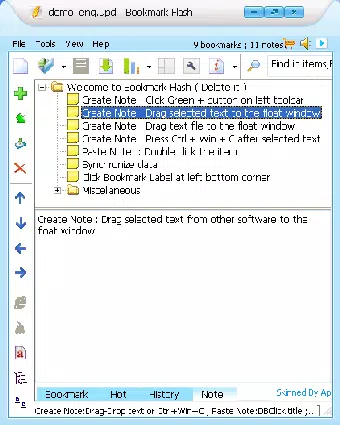
Bookmark Flash presents a clean, minimalist interface optimized for quick access and ease of use. The layout prioritizes functionality over visual complexity, with clearly labeled tools and intuitive placement of core features. Navigation is straightforward, relying on keyboard shortcuts and simple gestures such as double-clicking for note insertion, which reduces cognitive load and enhances usability.
Although the developer did not list formal performance metrics, the app’s lightweight design suggests it runs smoothly across a wide range of device categories, including older or low-spec smartphones. Responsiveness appears to be a key focus, with minimal lag reported in typical use cases involving bookmarking, note retrieval, and login autofill. Stability is implied by the app’s long-term availability, indicating consistent performance over time.
Users can expect a stable experience when performing routine tasks such as saving links or accessing stored credentials. The app’s portability further supports consistent performance across different devices, as it does not rely on system-level integrations that may vary between platforms. While specific compatibility details were not disclosed, the design philosophy emphasizes reliability and low overhead, making it a dependable tool for everyday use.
Platform Compatibility & Technical Requirements
Bookmark Flash is available for Android and iOS platforms, though specific OS versions and device requirements were not listed by the developer. The app’s file size is under 1MB, making it suitable for devices with limited storage space. This small footprint supports its classification as a portable greenware application, allowing users to run it without installation.
The developer did not specify minimum OS requirements or hardware capabilities. As such, users should verify compatibility with their device’s operating system before downloading. Despite the lack of detailed technical specifications, the app’s lightweight nature suggests broad compatibility with most modern smartphones and tablets. The absence of installation requirements further enhances accessibility across different environments.
Pros and Cons
Pros
- Extremely lightweight, under 1MB in size
- Portable—no installation required
- Intuitive one-click bookmarking and note pasting
- Integrated login manager for secure credential storage
- Efficient organization through categorization
- Long-standing presence with consistent functionality
Cons
- Developer did not provide OS or hardware requirements
- No official update history or release notes available
- Limited visual customization options
- No cloud sync or cross-device backup functionality mentioned
- Interface may appear outdated to newer users
FAQ
Is Bookmark Flash safe to use?
Yes, the app is designed to securely store login credentials and does not share data with third parties. However, users should ensure they are downloading from official sources to maintain security.
Can I use Bookmark Flash on multiple devices?
The app’s portable nature allows it to be used on different devices, but there is no mention of cloud sync or backup. Users must manually transfer data if switching devices.
Does Bookmark Flash require internet access?
Basic functionality such as saving bookmarks and notes does not require internet access. However, the login manager may need connectivity to autofill credentials on websites.
Is Bookmark Flash free to download?
While the pricing information was not provided, the app’s lightweight and portable design suggests it may be available at no cost. Users should check the official app store listing for current pricing.
How often is Bookmark Flash updated?
The developer has not published update history or release notes. Users should monitor the app store for new versions to ensure they have the latest features and security patches.
Final Thoughts
Bookmark Flash stands out as a focused, no-nonsense utility tool for users who value speed, simplicity, and efficiency in managing digital content. Its ability to combine bookmarking, note-taking, and login management in a single, under-1MB package makes it a compelling choice for those seeking a lightweight alternative to bloated productivity apps. While it lacks modern features like cloud sync and visual polish, its core functionality remains effective and reliable.
Students, researchers, and professionals who frequently gather and reuse online information will benefit most from its streamlined workflow. The app’s long-standing presence and minimal resource usage underscore its durability and practicality. For anyone looking to reduce digital clutter and save time on routine tasks, Bookmark Flash delivers tangible value without compromise.
Download Bookmark Flash now


